File compression is used to make media files smaller so they are easier to
store, upload, stream and download. In R093 you must balance file size and
quality for different products and platforms.
What Is File Compression?
Compression reduces the size of a file by encoding the data more efficiently. This is
important for images, audio, video and other media files used in digital products.
Smaller files take up less storage space.
They are quicker to upload and download.
They are easier to stream over slower connections.
Two Main Types of Compression
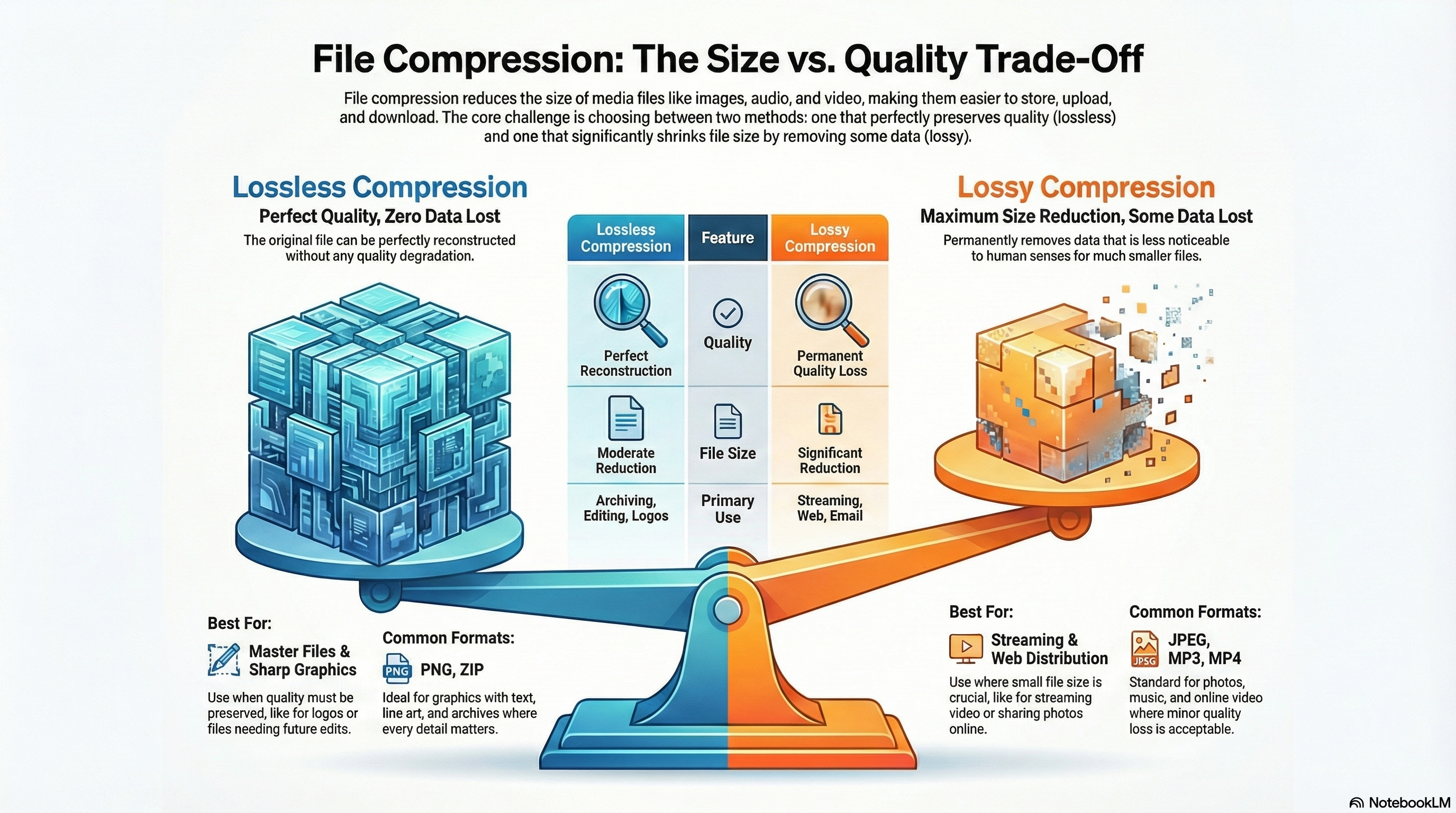
Lossless compression – no data is permanently removed; the original can be perfectly rebuilt.
Lossy compression – some data is permanently removed to achieve a much smaller file.
Exam questions often give you a scenario and ask you to choose which type of compression or
which format to use, and to justify
File Compression at a Glance
This infographic covers why we compress files, the difference between lossless and lossy, and how to choose settings.
Why Compress Files?
Reasons compression is essential in digital media production.
Smaller file sizes: save storage space on devices and servers.
Faster transfer: upload, download and streaming are quicker with compressed files.
Streaming: lower bitrates help media play smoothly over slower connections.
Backup & archiving: compressed folders make large projects easier to move or store.
Lossless vs lossy: lossless keeps all data; lossy removes some detail to shrink the file.
Exam link: explain why a client might want files compressed for web or email delivery.
Size · Speed · Streaming
Choosing Compression Types & Settings
Balancing quality and file size for different media products.
Lossless: used when quality must be preserved (e.g. master audio, working image files).
Lossy: used for distribution where small file size is more important (e.g. streaming).
Bitrate and quality sliders: higher settings = better quality but larger files.
Use case examples: small compressed versions for web; high-quality versions for print or cinema.
Artifacts: too much compression causes visible or audible distortion.
Exam tip: justify your choice of compression by referring to platform, audience and connection speed.
Quality · Bitrate · Trade-offs
Lossy vs Lossless Compression
You must be able to explain the difference between lossy and lossless
compression and give examples of where each is used.
Lossless Compression
No quality is lost – data is reconstructed exactly.
File size is reduced, but usually not as much as with lossy.
Examples: PNG images, some RAW formats, ZIP archives.
Good for graphics with text/line art, logos, and files that need to stay perfect.
Lossy Compression
Removes some data that is less noticeable to human senses.
Achieves much smaller file sizes.
Examples: JPEG images, MP3/AAC audio, many streamed video formats.
Good for photos, music and video where small quality loss is acceptable.
Choosing Between Them
Use lossless when perfect quality or editing is needed.
Use lossy for distribution where smaller files and fast delivery matter.
Compression, Quality and Audience Experience
Compression affects what the audience sees and hears. Too much compression can make a product
look or sound unprofessional.
Effects of Heavy Compression
Images – blocky areas, banding, loss of detail.
Audio – metallic or "swishy" sounds, loss of clarity.
Video – pixelation, artefacts in fast-moving scenes.
Balancing Quality and File Size
Higher quality = larger files = better picture/sound but slower to download or stream.
Lower quality = smaller files = faster delivery but may look or sound worse.
You must match compression settings to platform, connection speed
and audience expectations.
These games help you choose suitable formats and compression settings, and link them to platforms,
audiences and exam-style scenarios.
Mega game · File types
File Types Forge
Decide which file types and compression levels to use for images, audio and video across
different platforms and distribution methods.
Mega gameFormatsCompression
Distribution
Distribution Dash
Match client briefs to the best distribution platforms and file formats, including suitable
compression for web, mobile and print products.
MCQsFormatsPlatforms
All topics
iMedia Genius
Answer mixed R093 questions, including scenarios where you must choose the right level of
compression for different products and audiences.
Exam-styleWhole specMixed difficulty
Exam trainer
Exam Style Showdown
Practise breaking down exam questions about file formats and compression, and choose the best
points to score full marks.
Exam skillsCommand wordsPlanning answers
Exam Practice – File Compression (AI Marker)
Write your answers in the boxes below, then click Build & Copy AI Marking Prompt. Choose an AI tool and paste the prompt to get examiner-style marking and feedback.
Q1. State one reason why a school might compress image files before uploading them to its website. (1 mark)
Technique: Give a simple reason such as "to reduce file size so pages load faster".
Q2. Explain one reason why lossless compression might be chosen instead of lossy for a company logo. (2 marks)
Technique: Make one point about keeping the logo sharp/perfect, then explain how
this affects brand image or print quality.
Example structure: "Lossless compression keeps… This helps because…"
Q3. Describe three factors a producer should consider when deciding how much to compress a promotional video for a website. (3 marks)
Technique: Give three distinct factors such as audience connection speed, device
screen size and the importance of video quality for the brand.
Q4. Explain two problems that could occur if audio files are compressed too heavily for an online podcast series. (4 marks)
Technique: For each problem, describe what happens to the sound (e.g. loss of clarity,
artefacts) and explain the effect on the listener's experience.
Q5. A charity is creating an online campaign with a short video advert, web banners and downloadable
information leaflets. Discuss how file compression should be used for each of these products so that
they are good quality but still quick to access on different devices. Provide justified recommendations. (9 marks)
Technique: Organise your answer into paragraphs (video, images/graphics, documents).
For each, explain compression choices and link them to audience, platform and connection speed. Finish
with a justified conclusion.
Paragraph 1: Video – suitable format, resolution and bitrate for streaming.
Paragraph 2: Web banners – image formats, lossy vs lossless, fast loading.
Paragraph 3: Downloadable leaflets – PDF settings, balancing quality and size.
Final paragraph: Conclusion – justify the best compression choices overall.
Level 2 → Level 3 Boost (Q5)
As you type, this will spot what's missing for top-band answers.
Start typing your answer to see tailored targets.
Open an AI tool:
Can You Now…?
Explain the difference between lossy and lossless compression with examples.
Describe how compression affects file size, quality and audience experience.
Recommend suitable compression choices for different platforms and products.
Write exam answers that justify compression decisions clearly.