Audio files are used in podcasts, adverts, games, films and apps. In R093 you must pick
suitable file types, quality settings and compression so
that sound is clear but file sizes stay manageable.
What Are Audio Files?
Audio files store recorded sound such as voice, music and effects. Different formats are used for
recording, editing and distributing audio in media projects.
Used in podcasts, radio, adverts, games, films, animations and apps.
Common formats: WAV, MP3, AAC and others.
Exam questions often ask you to choose a format and justify why it suits the product and audience.
Key Ideas to Remember
File type (e.g. WAV vs MP3).
Compression – lossy vs lossless (link to Topic 31).
Quality settings – sample rate, bit depth, bitrate.
Audio Files at a Glance
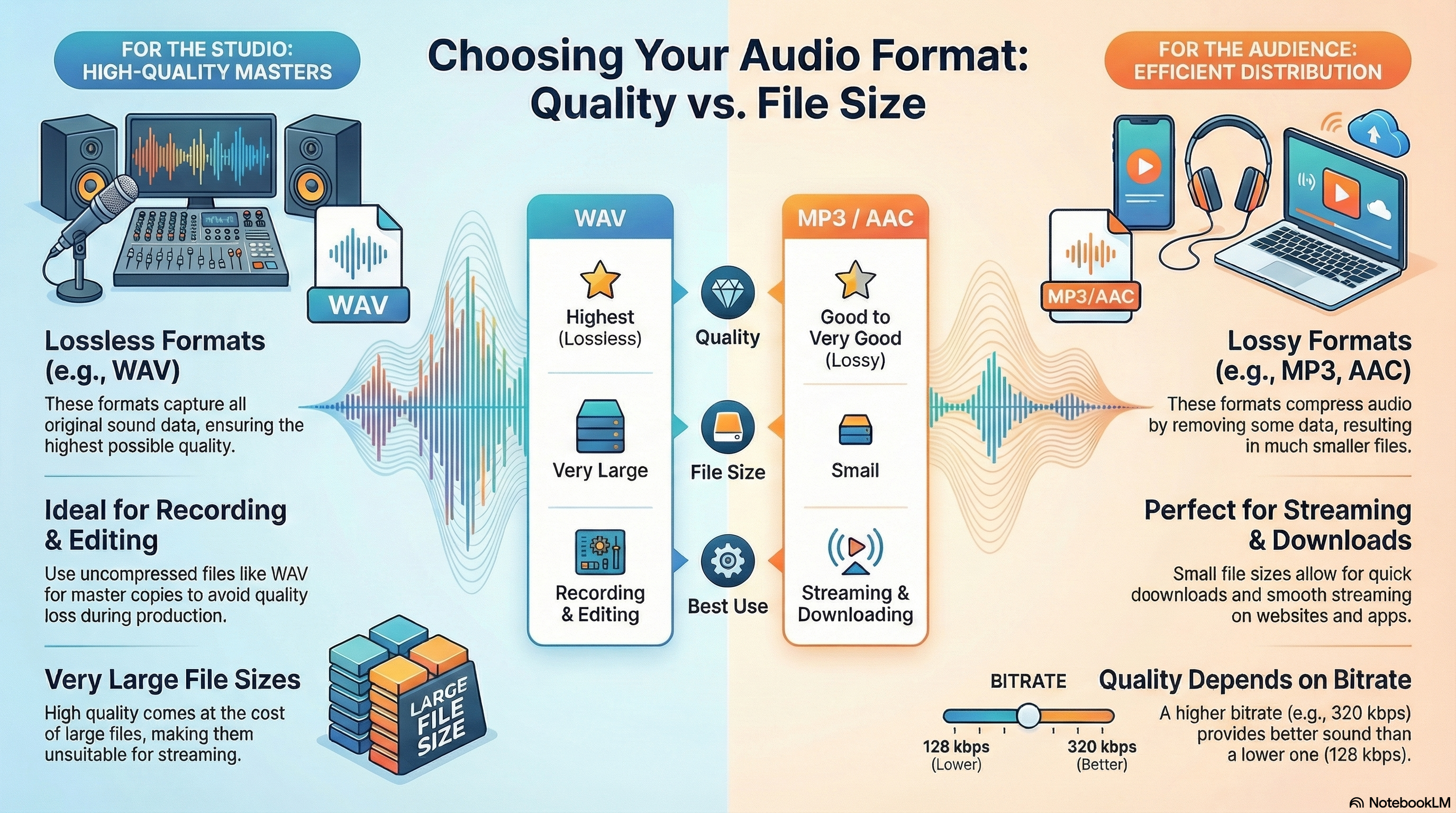
This infographic covers common audio formats, bitrates and how to choose the right file for each project.
Common Audio File Types
Lossless vs lossy audio and where each is used.
WAV: uncompressed or lossless, high quality, large files – good for editing.
MP3: lossy, very common for music and podcasts, small files.
AAC: lossy, used by many streaming services and devices.
FLAC/ALAC: lossless compression, high-quality music with smaller files than WAV.
OGG, WMA, etc.: other formats used in specific systems or games.
Exam link: choose a format based on quality needs and how the audio will be delivered.
Lossless · Lossy · Use
Bitrate, Quality & Usage
How audio settings affect sound quality and file size.
Bitrate: measured in kbps (e.g. 128, 192, 320) – higher means better quality, larger files.
Sample rate: e.g. 44.1 kHz or 48 kHz; higher rates capture more detail.
Editing masters: keep high-quality WAV or FLAC versions for mixing.
Online delivery: use compressed formats (e.g. MP3, AAC) for streaming and downloads.
Voice vs music: voice-only content may use lower bitrates than music.
Exam tip: justify audio choices by referring to platform, storage and audience expectations.
Bitrate · Sample Rate · Masters
Common Audio File Formats
You need to know the main audio formats used in media products and when each is appropriate.
WAV (.wav)
Usually uncompressed or lossless – very high quality.
Large file sizes.
Good for: recording and editing in the studio; master copies.
Not ideal for: streaming or downloading over slow connections.
MP3 (.mp3)
Lossy compression – removes some audio data.
Much smaller file sizes than WAV.
Good for: streaming music, podcasts, online audio for websites and apps.
Quality depends on bitrate (e.g. 128 kbps vs 320 kbps).
AAC (.aac)
Modern lossy format often used for streaming and downloads.
Can offer similar or better quality than MP3 at the same bitrate.
Used by many streaming platforms and devices.
Other Audio Formats
FLAC – lossless compressed format, smaller than WAV but still high quality.
Ogg Vorbis – open-source lossy format used by some platforms.
Audio Quality: Sample Rate, Bit Depth and Bitrate
Audio files have technical settings that affect how accurately the sound is stored and how big
the file will be.
Sample Rate
How many times per second the sound is measured, in Hz (e.g. 44.1 kHz).
Higher sample rate = more detail and higher potential quality.
Bit Depth
Number of bits used to store each sample (e.g. 16-bit, 24-bit).
Affects dynamic range – how well quiet and loud sounds are captured.
Bitrate (for Compressed Audio)
Amount of data used per second of audio (e.g. 128 kbps, 192 kbps, 320 kbps).
Higher bitrate = better quality but larger file size.
Lower bitrate = smaller files but quality may suffer.
In exams, you might not be asked to calculate these, but you should be able to describe what they do
and how they affect quality vs file size.
Compression, Streaming and Downloading
File compression and format choice affect how audio is delivered to the audience.
Why Compress Audio?
To reduce file size so audio can be downloaded or streamed quickly.
To save storage space on devices and servers.
To avoid buffering or long wait times on slower internet connections.
Streaming vs Downloading
Streaming – audio plays as it is received; needs good compression and a stable connection.
Downloading – entire file is saved; users can play offline but must wait for download.
Choosing Formats for Different Products
Use high-quality WAV or lossless formats while editing.
Export to compressed formats such as MP3 or AAC for online distribution.
Balance quality and file size based on audience, platform and purpose.
These games help you pick suitable audio formats, hardware and software, and practise writing
exam-style answers about sound in media products.
Mega game · File types
File Types Forge
Choose file formats and compression settings for images, audio and video in real client briefs,
including podcasts, trailers and radio adverts.
Mega gameFormatsCompression
Mega game · Hardware & software
Hardware & Software Gauntlet
Explore the hardware and software needed to record, edit and export audio for different media
products, from studio microphones to editing suites.
Mega gameHardwareSoftware
Exam trainer
Explain It! 2-Mark Engine
Practise perfect 2-mark answers on advantages and disadvantages of different audio formats
and compression choices.
2 markersPEE structureTargeted practice
All topics
iMedia Genius
Face mixed R093 questions, including choosing audio formats and explaining how sound quality
and compression affect the final product.
Exam-styleWhole specMixed difficulty
Exam Practice – Audio Files (AI Marker)
Write your answers in the boxes below, then click Build & Copy AI Marking Prompt. Choose an AI tool and paste the prompt to get examiner-style marking and feedback.
Q1. State one advantage of using MP3 files for a school podcast. (1 mark)
Technique: Give a simple advantage such as "small file size so episodes are quick to download or stream".
Q2. Explain one reason why a radio advert might be saved as a WAV file during editing but exported as an MP3 for broadcast. (2 marks)
Technique: Make one point about high-quality editing with WAV, then explain why MP3 is better
for distribution (e.g. smaller files, easier to send or store).
Example structure: "WAV is used because… MP3 is then used because…"
Q3. Describe three factors a producer should consider when choosing an audio format for music used in a mobile game. (3 marks)
Technique: Give three distinct factors such as file size, sound quality and device storage limits.
Q4. Explain two problems that could occur if the bitrate of streamed audio is set too low for an online music platform. (4 marks)
Technique: For each problem, describe what happens to the sound (e.g. artefacts, dull tone)
and explain how this affects the listener's experience and view of the service.
Q5. A college is producing a series of revision podcasts that will be available on the college website
and through a popular streaming app. Discuss how the media team should choose audio formats, bitrates
and compression settings so that episodes are high quality but still easy to stream and download on
different devices. Provide justified recommendations. (9 marks)
Technique: Organise your answer into paragraphs (recording/editing format, distribution format,
bitrates and access). For each, explain your choices and link them to audience, devices and connection speed.
Finish with a justified conclusion.
Paragraph 1: Recording and editing – high-quality WAV or similar in the studio.
Paragraph 2: Distribution – MP3 or AAC for website and streaming app.
Paragraph 3: Bitrates – balance quality and file size for typical student devices and bandwidth.
Paragraph 4: Accessibility – streaming vs download options and offline listening.
Final paragraph: Conclusion – justify the best overall approach.
Level 2 → Level 3 Boost (Q5)
As you type, this will spot what's missing for top-band answers.
Start typing your answer to see tailored targets.
Open an AI tool:
Can You Now…?
Describe common audio file formats and when they are suitable.
Explain how sample rate, bit depth and bitrate affect audio quality and file size.
Recommend suitable audio formats and compression settings for different products and platforms.
Write exam answers that clearly justify audio format and quality choices.