Hardware and software are the tools that make media production possible.
In R093 you must link the right kit and applications to different products, roles and stages of production.
What Do We Mean by Hardware & Software?
In creative iMedia, hardware and software are chosen carefully to match the task. You need to know
which devices and applications are suitable for pre-production, production
and post-production across different media sectors.
- Hardware – physical devices (computers, cameras, microphones, scanners, tablets, phones).
- Software – applications used to plan, create, edit and export media products.
- Exam questions often ask you to recommend hardware and software for a client brief and
justify your choices.
Key Things to Link in Answers
- Product type (e.g. poster, podcast, video advert, website).
- Role (e.g. camera operator, graphic designer, video editor, sound designer).
- Stage of production (planning, production, review, export).
Hardware & Software at a Glance
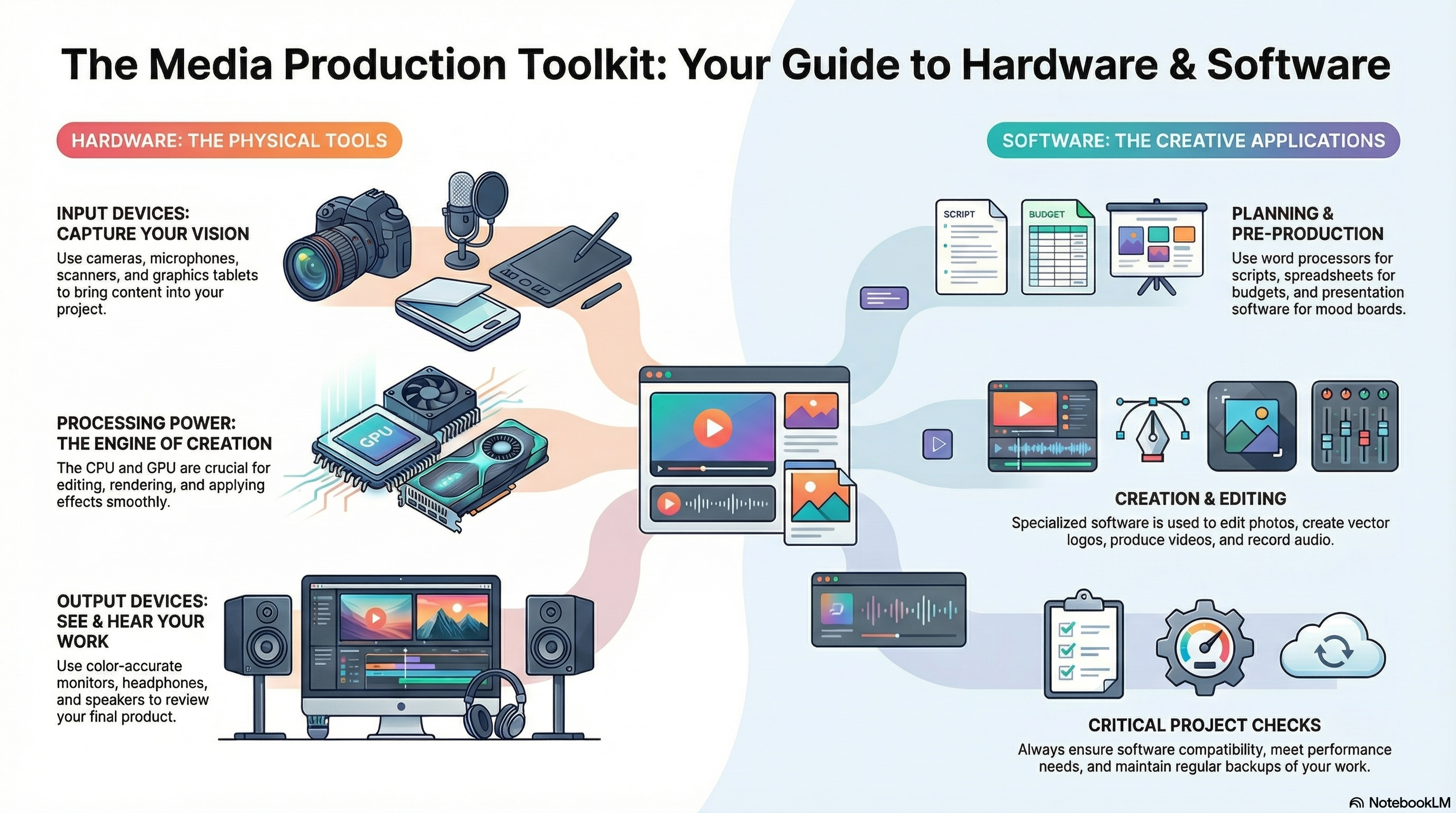
This infographic summarises key hardware and software used in media production and how they work together.
- Input devices: cameras, microphones, graphics tablets, scanners, controllers.
- Output devices: monitors, speakers, headphones, projectors, VR headsets.
- Processing: CPUs and GPUs handle editing, rendering and effects.
- Storage: hard drives, SSDs and memory cards store project files and assets.
- Networking: routers and switches used to share files and access cloud services.
- Exam link: choose hardware that matches the resolution, file type and performance needs of the project.
Input · Output · Storage
- Operating systems: Windows, macOS, Linux – run hardware and manage files.
- Editing software: image, audio and video editors used for content creation.
- Authoring tools: web design, animation, game engines and DTP software.
- Drivers & utilities: keep devices working correctly and optimise performance.
- Licensing & updates: ensure software is legal, supported and kept secure.
- Exam tip: when recommending software, link to file types, platform and team skills.
Edit · Author · Manage
Hardware for Media Production
Different media products rely on different hardware. You should be able to name examples and explain why
they are suitable.
General Hardware
- Desktop and laptop computers – running editing and design software.
- Monitors – colour-accurate screens and multiple displays for editing.
- Input devices – keyboard, mouse, graphics tablet, touchscreens.
- Storage – internal hard drives/SSDs, external drives, memory cards, cloud storage.
Specialist Production Hardware
- Cameras – DSLR, mirrorless or cinema cameras for stills and video.
- Microphones – handheld, lapel, shotgun mics for clear audio recording.
- Lighting – softboxes, LED panels, reflectors for consistent lighting.
- Tripods, gimbals and rigs – keeping shots stable and smooth.
- Scanners & graphics tablets – importing and drawing artwork.
Choosing Suitable Hardware
- Think about portability vs power (laptops on location vs desktops in a studio).
- Match hardware to the task – e.g. high-resolution camera for a print campaign.
- Consider budget, reliability and durability for real client scenarios.
Software for Planning and Production
Creative projects use different types of software at each stage of the process.
Planning (Pre-production) Software
- Word processors – scripts, treatments, interview questions.
- Presentation software – pitching ideas, mood boards.
- Spreadsheets – work plans, budgets, asset logs.
- Specialist planning tools – mind mapping, project management apps.
Graphics and Layout Software
- Bitmap editors – editing photos and adverts.
- Vector graphics software – creating logos and icons.
- DTP (desktop publishing) – magazines, leaflets, posters, flyers.
Audio & Video Software
- Audio editors/DAWs – recording and editing podcasts, sound effects and music.
- Video editing software – cutting footage, adding titles, transitions and effects.
- Animation software – motion graphics, animated logos and simple 2D/3D animation.
Web & Interactive Software
- Web design tools and content management systems (CMS).
- Game engines for interactive products.
- App builders and prototyping tools for mobile interfaces.
Performance, Compatibility and Backups
Choosing hardware and software is not just about features – you must also consider performance,
compatibility and keeping work safe.
Performance and Specifications
- CPU – affects speed when editing, exporting and rendering projects.
- RAM – more memory helps when working with large files and multiple applications.
- Graphics card (GPU) – important for video editing, 3D and some effects.
- Storage – SSDs for speed, hard drives for larger capacity.
Compatibility
- Check software will run on the chosen operating system and hardware.
- Ensure file formats are supported by client systems and distribution platforms.
- Think about how files will be shared between team members and devices.
Backups and Data Security
- Use regular backups to external drives or cloud storage.
- Keep multiple copies of important project files.
- Protect client work with passwords and secure storage where appropriate.
Games to Practise Hardware & Software
These games help you match hardware and software to briefs, and practise explaining your choices
in exam-style questions.
Mega game · Hardware & software
Hardware & Software Gauntlet
Work through scenarios choosing devices and applications for different media projects,
from location filming kits to school editing suites.
Mega game
Hardware
Software
Mega game · File types
File Types Forge
Choose suitable file formats and compression settings for images, audio and video,
linking your choices to the hardware and software being used.
Mega game
Formats
Compression
Exam trainer
Explain It! 2-Mark Engine
Practise writing clear 2-mark answers about hardware and software advantages,
disadvantages and differences using PEE structure.
2 markers
PEE structure
Targeted practice
All topics
iMedia Genius
Take on mixed R093 questions, including hardware and software scenario questions that
mirror the real exam.
Exam-style
Whole spec
Mixed difficulty
Exam Practice – Hardware & Software
Q1. State one advantage of using an SSD instead of a traditional hard drive in a video editing computer. (1 mark)
Technique: Give a simple advantage such as “faster read/write speeds so files load more quickly”.
Q2. Explain one difference between an input device and an output device, using examples from media production. (2 marks)
Technique: Make one clear difference (data going into vs out of the system) and give an
example of each linked to media work.
Example structure: “An input device is… For example… An output device is… For example…”
Q3. Describe three factors a college should consider when choosing computers for a new media editing suite. (3 marks)
Technique: Give three distinct factors such as processor speed, RAM capacity and storage
(type and size).
Q4. Explain two problems that could occur if a student uses a low-spec laptop to edit a high-definition video project. (4 marks)
Technique: For each problem, describe what happens (e.g. slow performance, crashes)
and explain how this affects the project (deadlines, quality, reliability).
Q5. A local community centre wants to set up a small studio to produce video interviews and social media
content. Discuss the hardware and software that should be chosen for recording, editing and publishing
the content. Provide justified recommendations. (9 marks)
Technique: Organise your answer into paragraphs (recording kit, editing computers/software,
storage and backup, publishing). For each, explain what you would choose and why it suits the client, budget
and intended platforms. Finish with a justified conclusion.
- Paragraph 1: Recording – cameras, microphones, lighting, tripods.
- Paragraph 2: Editing – computers, monitors and editing software.
- Paragraph 3: Storage & backup – drives, cloud, protecting files.
- Paragraph 4: Publishing – exporting formats and platforms (web, social media).
- Final paragraph: Conclusion – justify the overall hardware and software choices.
Can You Now…?
- Describe suitable hardware for different media products and roles.
- Match software types to planning, production and post-production tasks.
- Explain how performance, compatibility and backups affect real projects.
- Write exam answers that justify hardware and software choices clearly.