Asset logs, flow charts and scripts are practical planning tools that turn ideas into
organised, usable plans. They help teams track files, design user journeys and capture exactly
what will be said and shown.
What Are Asset Logs, Flow Charts and Scripts?
In R093 you must recognise and explain three important pre-production documents:
Asset logs – tables used to list and track media assets.
Flow charts – diagrams showing navigation and choices, especially in interactive products.
Scripts – written documents showing dialogue, action and sometimes camera or audio directions.
Why They Matter
They make production more efficient and organised.
They reduce the risk of missing files, confusing navigation or weak dialogue.
Exam questions may ask you to identify components, explain their purpose or suggest improvements.
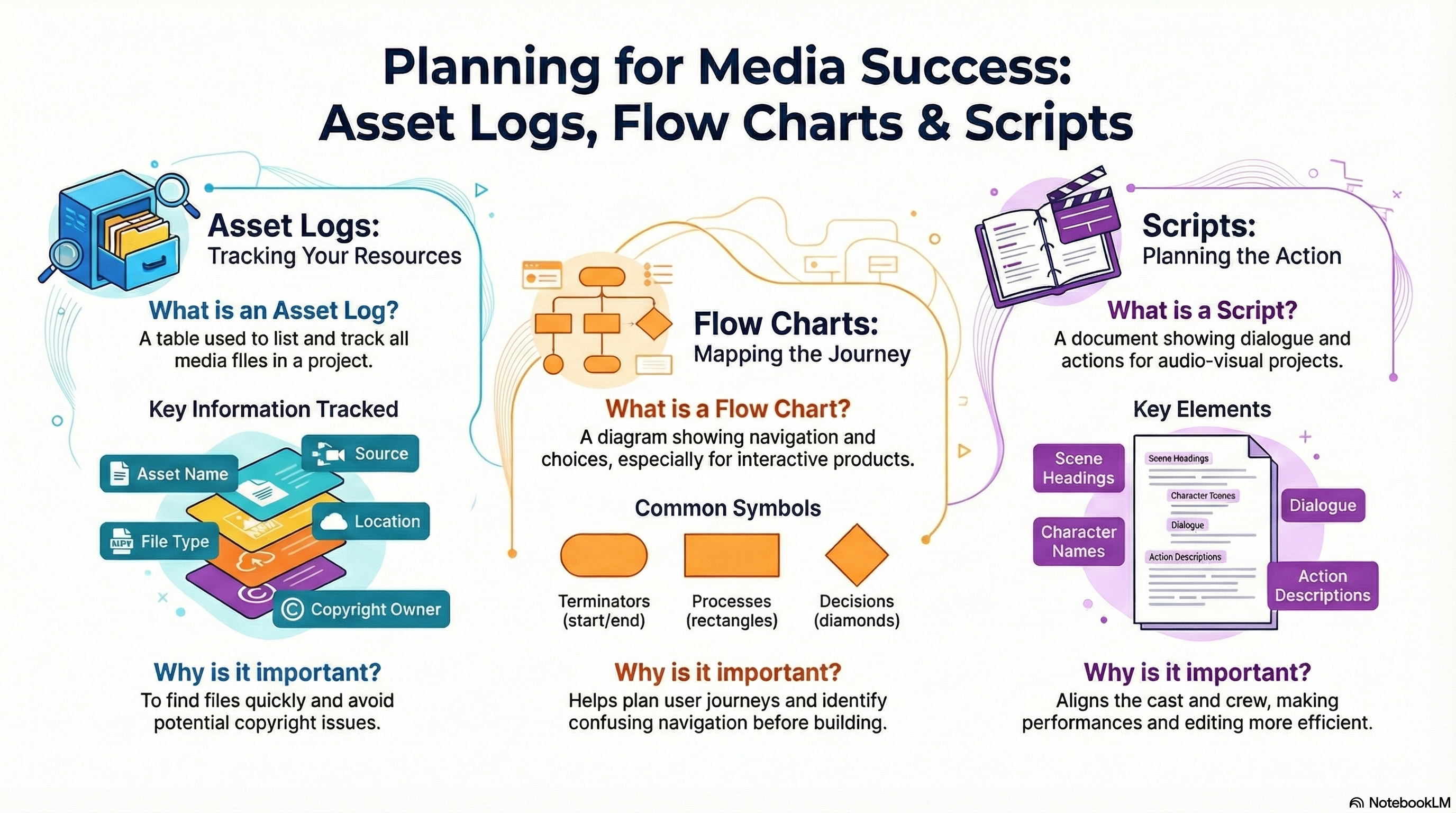
Asset Logs, Flow Charts & Scripts at a Glance
These infographics summarise how different pre-production documents organise assets, structure journeys
and support recording.
Asset Logs & Flow Charts
Tracking files and mapping user journeys in interactive products.
Purpose: makes it easy to find files, check permissions and see what still needs creating.
Flow chart symbols: start/end, process, decision and arrows for paths.
Flow chart use: shows screens, links and choices in websites, apps or games.
Exam link: describe how these documents reduce confusion and save production time.
Tip: mention how asset logs support copyright checks and backups.
Tracking · Navigation · Clarity
Scripts
Planning dialogue, action and sometimes camera/audio directions.
Dialogue: lines spoken by characters, including voiceover.
Action: brief descriptions of what happens on screen.
Technical directions: camera shots, sound cues or editing notes (if required).
Layout: speaker names, centred or clearly labelled, and scene headings.
Uses: keeps cast and crew aligned and reduces wasted takes.
Exam tip: explain how a good script makes performances and editing more efficient and effective.
Dialogue · Action · Direction
Asset Logs – Tracking Files and Resources
An asset log is a table used to keep track of all the media assets used in a project.
This might include images, audio clips, video files, text files and logos.
Typical Columns in an Asset Log
Asset ID / number – a unique code for each asset.
Asset name / description – what the asset is.
Type / format – e.g. JPEG image, WAV audio, MP4 video.
Location / file path – where the asset is stored.
Source – where it came from (own work, client, stock site).
Owner / copyright – who owns it and what licence applies.
Intended use – where it will appear in the final product.
Why Asset Logs Are Important
Make it easy to find files quickly during editing.
Help track permissions and avoid copyright issues.
Show that assets are suitable formats for their intended use.
Flow Charts – Mapping User Journeys and Logic
A flow chart is a diagram that shows the sequence of steps or choices
in a process. In media projects, they are often used for interactive products such as
websites, apps and games.
Common Flow Chart Symbols
Terminator (rounded rectangle) – start or end point.
Process (rectangle) – an action or step.
Decision (diamond) – a yes/no question or choice.
Arrows – show the direction of flow from one step to the next.
How Flow Charts Help
Show how users move from one screen or section to another.
Reveal problems such as dead ends or confusing navigation.
Help teams agree the structure before building the product.
Scripts – Dialogue, Action and Direction
A script is used for audio-visual products such as adverts, films, animations,
radio shows and podcasts. It tells performers and crew what will be said, seen and heard.
Key Elements of a Script
Scene headings – where and when the action takes place.
Action / description – what is happening on screen.
Character names – who is speaking.
Dialogue – what each character says.
Technical directions (in some scripts) – camera shots, sound effects or music cues.
Why Scripts Are Important
Ensure performers know exactly what to say and when.
Help directors plan shots and audio in advance.
Support continuity so that re-takes and edits still make sense.
Improving Scripts
Make dialogue clear, concise and suitable for the target audience.
Check that instructions are detailed enough for the cast and crew.
Ensure tone and language match the purpose (e.g. persuasive, informative, entertaining).
Use the NotebookLM for this topic to test yourself on the purpose and components of
asset logs, flow charts and scripts, using practice questions and flashcards.
Games to Practise Asset Logs, Flow Charts and Scripts
These games help you decide which planning document to use, improve weak scripts and
connect asset management and flow to real exam questions.
Exam practice
9-Mark AI Trainer
Practise full 9-mark responses using real R093-style scenarios, then generate an AI marking prompt to get a score and clear feedback.
9 markersFull answersAI feedback
Pre-production
Document Doctor
Choose the correct planning document for different tasks and identify key components,
including where asset logs, flow charts and scripts should be used.
MCQsPlanning docsComponents
Pre-production
Pre-production Document Detective
Identify different pre-production documents from extracts, including asset logs,
flow charts, scripts, storyboards and visualisation diagrams.
MCQsPlanning docsPurposes
Pre-production
Script Surgeon
Upgrade weak scripts by improving dialogue, adding action descriptions and including
clearer directions for camera and sound.
9 markersScriptsImprovements
Pre-production
Pre-Production Race
Place pre-production documents, including asset logs, flow charts and scripts, into the
correct phase and check they appear at the right time in the workflow.
Short answersWorkflowsPhases
Asset logs & scripts
Pre‑Production Toolkit
Choose the correct pre-production document for each scenario: work plans, mind maps, scripts, storyboards and more.
Arcade quizPre‑productionDocuments
Exam Practice – Asset Logs, Flow Charts and Scripts (AI Marker)
Write your answers in the boxes below, then click Build & Copy AI Marking Prompt. Choose an AI tool and paste the prompt to get examiner-style marking and feedback.
Q1. State one purpose of an asset log in a media project. (1 mark)
Technique: Give a clear purpose such as "to keep a record of all files used in the project"
or "to track where assets are stored and who owns them".
Q2. Explain one way a flow chart can help when designing an interactive quiz app. (2 marks)
Technique: Make one point about how the flow chart helps (e.g. showing question order or
what happens after each answer) and then explain the impact on the user experience.
Example structure: "A flow chart is used to… This helps because…"
Q3. Describe three pieces of information that should be included in a script for a short radio advert. (3 marks)
Technique: Give three distinct elements, such as character names, dialogue, sound effect
cues or timings.
Q4. Explain two problems that could occur if a project does not use an asset log. (4 marks)
Technique: For each problem, describe what might go wrong (e.g. missing files, using
unlicensed assets) and then explain how it could affect the final product or schedule.
Q5. A small team is producing an interactive training video for a charity. Discuss how asset logs,
flow charts and scripts should be used together during pre-production to ensure the project runs
smoothly and meets the client's needs. Provide justified recommendations. (9 marks)
Technique: Structure your answer into paragraphs for each document. Explain how each one
supports planning and production, then finish with a justified conclusion explaining why using all three
together is most effective.
Paragraph 1: Asset logs – tracking images, video clips, voiceover files and music.
Paragraph 2: Flow charts – mapping user choices and navigation through the training video.