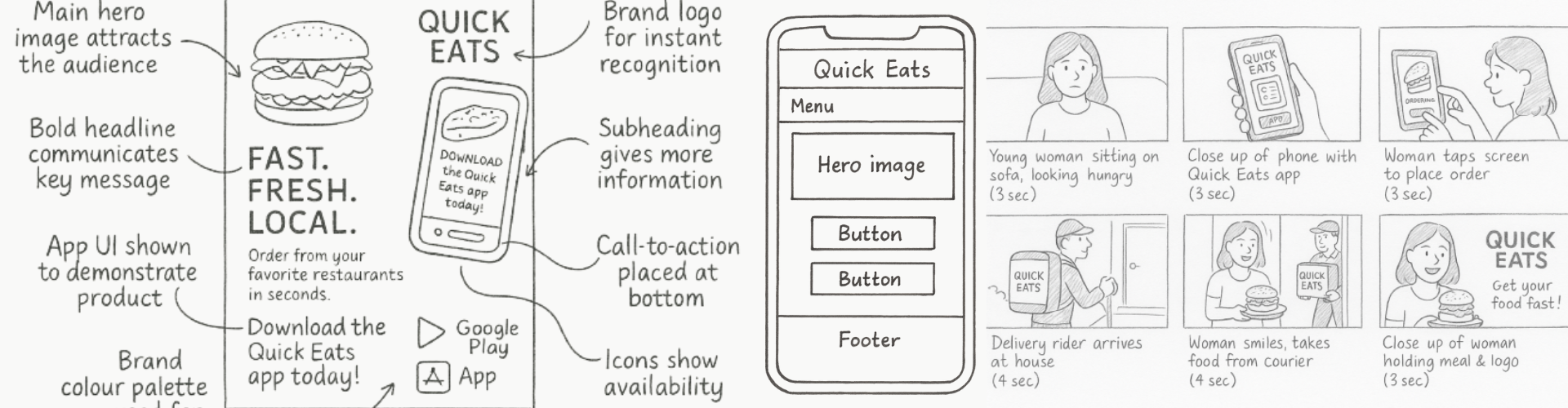
Storyboards, visualisation diagrams and wireframes turn ideas into clear visuals.
They show what the audience will see on screen or page, and how they will move through a product,
before any final assets are created.
What Are Storyboards, Visualisations and Wireframes?
In R093 you must recognise and explain three key visual planning documents:
Storyboards – show the sequence of shots for moving image products.
Visualisation diagrams – show the layout and style of a single page or screen.
Wireframes – show the structure and navigation of interactive products such as websites and apps.
Why They Matter
Help clients and teams visualise the product before production.
Reduce mistakes and reshoots by planning shots, layouts and navigation early.
Provide evidence in the exam that you understand pre-production documents and when to use them.
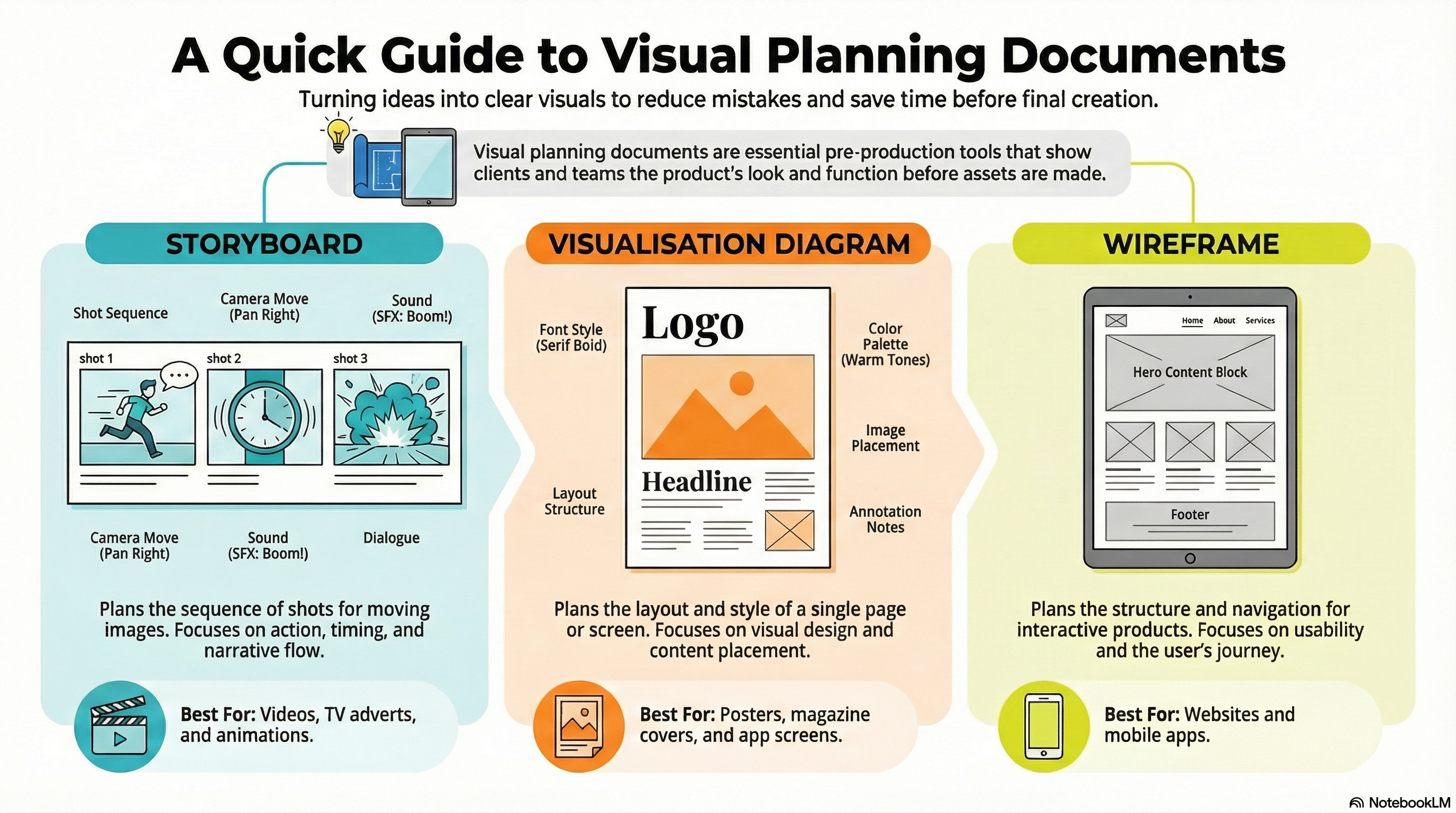
Storyboards, Visualisations & Wireframes at a Glance
This infographic shows how each visual planning document supports different types of media product.
Storyboards & Visualisation Diagrams
Planning moving image and single layouts before production.
Storyboards: frames showing shot order, action, dialogue and sometimes sound.
Shot details: shot type, camera movement and duration notes.
Visualisation diagrams: sketch of what a single page, poster or screen will look like.
Annotations: notes on colour, fonts, images and copy placement.
Uses: help clients and teams picture the final product early.
Exam link: explain how these documents reduce mistakes and reshoots.
Sequence · Layout · Detail
Wireframes
Planning structure and navigation for websites and apps.
Structure: shows where navigation, content blocks and CTAs will go.
Navigation: menus, links and interactive elements placed clearly.
Low-fidelity: basic boxes and labels without full graphics or colours.
User journeys: how a user will move from one screen or page to another.
Uses: test layout ideas and navigation before visual design.
Exam tip: when asked to justify a wireframe, talk about clarity, usability and responsiveness.
Structure · Navigation · Usability
Storyboards – Planning Moving Image Products
A storyboard is a sequence of frames (like a comic strip) that shows how a video,
animation or advert will unfold shot by shot.
Typical Features of a Storyboard
Images / sketches – rough drawings of each shot.
Shot type and angle – e.g. close-up, mid shot, long shot, high angle, low angle.
Transitions – how one shot moves to the next (cut, fade, dissolve).
Why Storyboards Are Useful
Give directors and camera operators a clear plan for filming or animating.
Help match audio and visuals, especially for adverts, trailers and explainer videos.
Allow clients to suggest changes before expensive production work begins.
Visualisation Diagrams – Planning Single Screens or Pages
A visualisation diagram (sometimes called a concept sketch) shows the design of one
product page or screen, such as a poster, magazine cover, app screen or web banner.
Typical Features of a Visualisation Diagram
Rough layout – placement of images, titles, logos and body text.
Placeholder content – simple boxes and scribbles where real images and text will go.
Colour and style notes – brief labels for colour schemes, fonts and design elements.
Use the NotebookLM for this topic to revise key features and purposes of storyboards,
visualisation diagrams and wireframes, and to test yourself with practice questions.
Games to Practise Storyboards, Visualisations and Wireframes
These games help you recognise different planning documents, pick the correct one for a brief
and link them to real exam-style scenarios.
Pre-production
Document Doctor
Decide when to use storyboards, visualisation diagrams, wireframes and other planning documents
based on different project briefs.
MCQsPlanning docsComponents
Pre-production
Pre-production Document Detective
Identify extracts from storyboards, visualisation diagrams and wireframes and match them
to their correct names and purposes.
MCQsPlanning docsPurposes
Pre-production
Pre-Production Race
Place planning documents, including storyboards, visualisation diagrams and wireframes, into
the correct pre-production phase and order.
Short answersWorkflowsPhases
9-mark trainer
9-Mark Ninja
Practise extended answers that justify the use of storyboards, visualisation diagrams
and wireframes for different types of media products.
9 markersStructurePlanning
9-mark trainer
9-Mark AI Trainer
Write a full 9-mark answer using real R093-style scenarios, then generate an AI marking prompt to get a score and feedback.
9 markersFull answersAI feedback
Storyboards & visuals
Pre‑Production Toolkit
Choose the correct pre-production document for each scenario: work plans, mind maps, scripts, storyboards and more.
Arcade quizPre‑productionDocuments
Exam Practice – Storyboards, Visualisations and Wireframes (AI Marker)
Write your answers in the boxes below, then click Build & Copy AI Marking Prompt. Choose an AI tool and paste the prompt to get examiner-style marking and feedback.
Q1. State one purpose of a storyboard when planning a TV advert. (1 mark)
Technique: Give a simple, clear purpose such as "to show the sequence of shots"
or "to plan what will be seen and heard in each shot".
Q2. Explain one reason why a designer creates a visualisation diagram before making a poster. (2 marks)
Technique: Make one point about how the diagram helps (e.g. testing layout or hierarchy)
and explain the impact on the final design or client feedback.
Example structure: "A visualisation diagram is used to… This helps because…"
Q3. Describe three features you would expect to see on a wireframe for a college homepage. (3 marks)
Technique: Give three distinct structural features such as navigation menu placement,
main content area and footer links.
Q4. Explain two problems that might occur if a project does not use a storyboard when producing a video advert. (4 marks)
Technique: For each problem, describe what could go wrong (e.g. missing shots,
continuity errors) and explain how it would affect time, cost or quality.
Q5. A charity is creating a new awareness campaign that includes a short video advert, posters and
an information website. Discuss how storyboards, visualisation diagrams and wireframes should be used
together at the planning stage to ensure a consistent, effective campaign. Provide justified
recommendations. (9 marks)
Technique: Organise your answer into paragraphs for each document and link them clearly
to the campaign brief. Explain how they support consistent branding, clear messaging and a smooth
user experience, then end with a justified conclusion.
Paragraph 1: Storyboards – planning the video advert's shots, timings and transitions.
Paragraph 2: Visualisation diagrams – planning poster and key web visuals.
Paragraph 3: Wireframes – planning website structure and navigation.
Final paragraph: Conclusion – justify why using all three leads to a stronger overall campaign.
Level 2 → Level 3 Boost (Q5)
As you type, this will spot what's missing for top-band answers.
Start typing your answer to see tailored targets.
Open an AI tool:
Can You Now…?
Describe the purpose and key features of storyboards, visualisation diagrams and wireframes.
Identify which document is most suitable for different types of media products.
Explain how these planning documents help teams and clients before production starts.
Use them confidently in exam answers with clear explanation and justification.