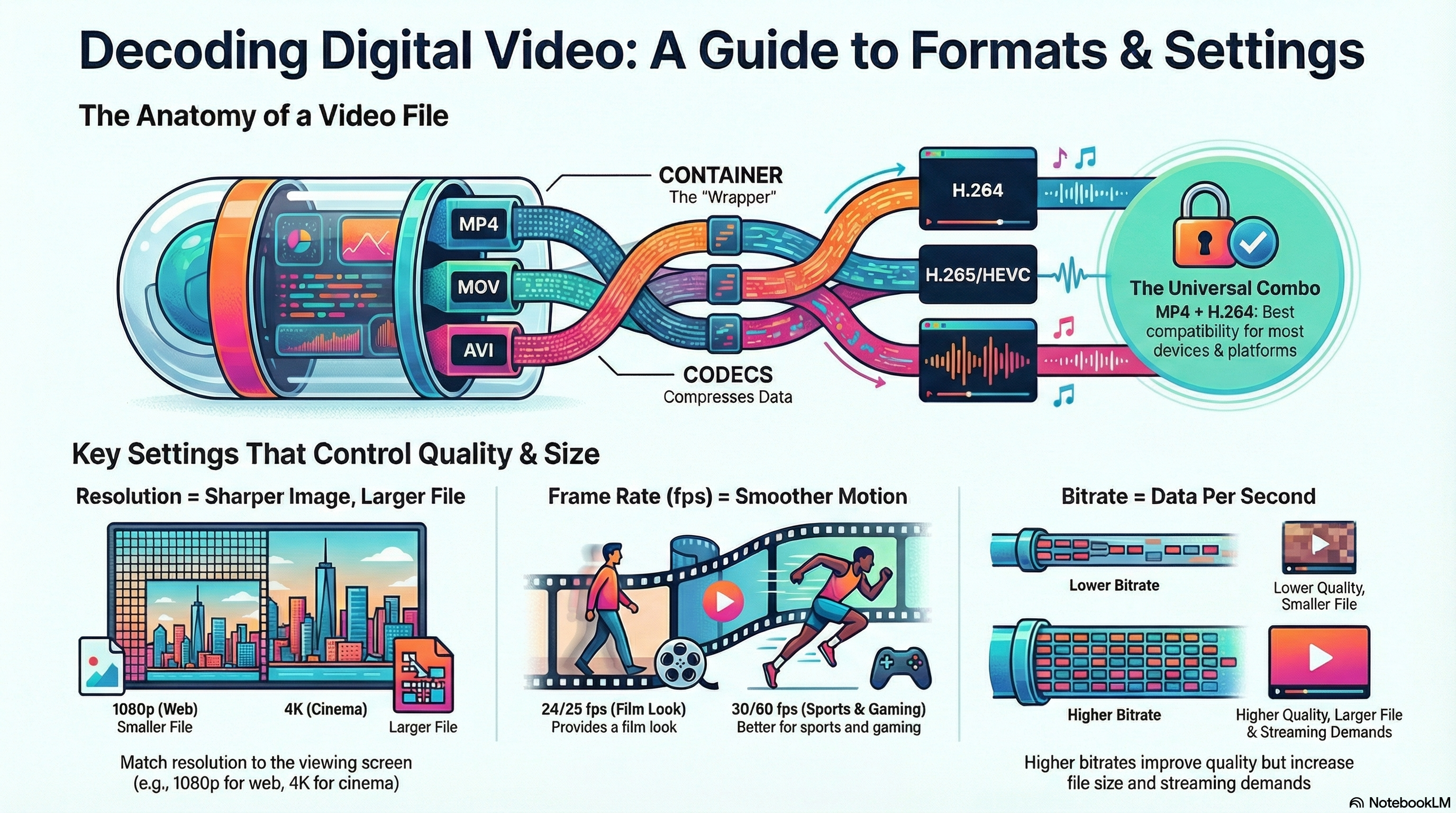
Moving image files store video and animation for adverts, trailers, social media clips,
films and more. In R093 you must choose suitable formats, codecs,
resolutions and bitrates so products play smoothly and look professional.
What Are Moving Image Files?
Moving image files store sequences of images (frames) and usually sound as well. They are used in
TV adverts, trailers, explainer videos, films, animations, social media content and games.
Use the NotebookLM for this topic to revise containers vs codecs, resolution, frame rate, bitrate
and streaming, then test yourself with its question tools.
These games help you choose video formats and settings for briefs, and apply your moving image
knowledge in realistic revision scenarios.
Mega game · File types
File Types Forge
Make decisions about file formats and compression for images, audio and video in real client projects,
including trailers and explainer videos.
Mega gameFormatsCompression
Distribution
Distribution Dash
Match video products to suitable platforms and file formats, thinking about streaming, downloads
and different audience devices.
MCQsFormatsPlatforms
Mega game · Hardware & software
Hardware & Software Gauntlet
Explore the equipment and software needed to capture, edit and export video, from cameras and
tripods to editing suites and export presets.
Mega gameHardwareSoftware
Mixed exam
Escape Room: R093
Break out of each room by answering mixed R093 questions, including video format and streaming
scenarios that test your moving image knowledge.
MixedWhole specChallenge mode
Exam Practice – Moving Image Files (AI Marker)
Write your answers in the boxes below, then click Build & Copy AI Marking Prompt. Choose an AI tool and paste the prompt to get examiner-style marking and feedback.
Q1. State one advantage of using an MP4 file format for a video on a college website. (1 mark)
Technique: Give a simple advantage such as "widely supported so it plays on most devices"
or "good quality with a relatively small file size".
Q2. Explain one reason why a video editor might choose to export a project using the H.264 codec. (2 marks)
Technique: Make one point about what H.264 offers (e.g. good quality at smaller file sizes)
and explain why this helps with streaming or downloading.
Example structure: "H.264 is chosen because… This helps because…"
Q3. Describe three factors that should be considered when choosing resolution and frame rate for a social media video. (3 marks)
Technique: Give three distinct factors such as typical screen size, connection speed/data
limits and type of content (fast action vs simple talking head).
Q4. Explain two problems that could occur if the bitrate is set too low when exporting a promotional video for a streaming platform. (4 marks)
Technique: For each problem, describe what happens (e.g. blocky/pixelated image, loss of detail)
and explain how this affects the audience's impression of the brand or product.
Q5. A charity is creating a short promotional video to be shared on social media, embedded on its website
and shown on a large screen at an event. Discuss how the media team should choose video formats, codecs,
resolution and bitrate so that the video looks good and plays reliably in all three situations. Provide
justified recommendations. (9 marks)
Technique: Organise your answer into paragraphs (social media, website, event screen).
For each, explain format and quality choices and link them to audience, devices and connection speed.
Finish with a justified conclusion.
Paragraph 1: Choose a common format/codec (e.g. MP4 with H.264) suitable for all platforms.
Paragraph 2: Social media – resolutions, aspect ratio and bitrate for mobile viewing.
Paragraph 3: Website – balance image quality and loading speed.
Paragraph 4: Event screen – higher resolution and bitrate for a large display copy.
Final paragraph: Conclusion – justify why this approach works well overall.
Level 2 → Level 3 Boost (Q5)
As you type, this will spot what's missing for top-band answers.
Start typing your answer to see tailored targets.
Open an AI tool:
Can You Now…?
Explain the difference between containers and codecs for moving image files.
Describe how resolution, frame rate and bitrate affect quality and file size.
Recommend suitable video formats and settings for different platforms and scenarios.
Write exam answers that clearly justify moving image format and compression choices.